My favourite productivity app in 2025? A text file. And yet I went through Notion, Todoist and Obsidian, and nearly ended up with a corporate pet called Jira.
In 2025 I need to organise a lot in my life. I am dealing with cancer in the family, I have been admitted to university at a ripe old age, under the pressure of the accelerating use of artificial intelligence in software development I am forced to keep learning in my field all the time, and, last but not least, I would like to have a personal life.
Like everyone, I thought I needed a fancy productivity app. I started with Notion and Todoist. Notion was overkill for me; with Todoist I appreciated the user experience and the clarity of the design. In recent months, partly because I was familiar with it from work, I handled my personal projects and tasks in Jira. Overkill as well. But it worked for me. Even though I did not use 90 % of the features Jira offers its users.
I tried Obsidian, which until recently I used as the source of all my notes, jottings and analyses of the books and articles I had read. What I liked about Obsidian was the idea that all my data is stored on disk in what is de facto text form (Obsidian uses Markdown). And at the same time I was satisfied by the minimalism that comes from it being, at its core, a text file (even though Obsidian offers many plugins).
In the end I left Obsidian too, because I realised that for quite some time I had already been using one app that is de facto text-based and that I have available for free across the whole ecosystem of computers and mobile devices: Apple Notes.
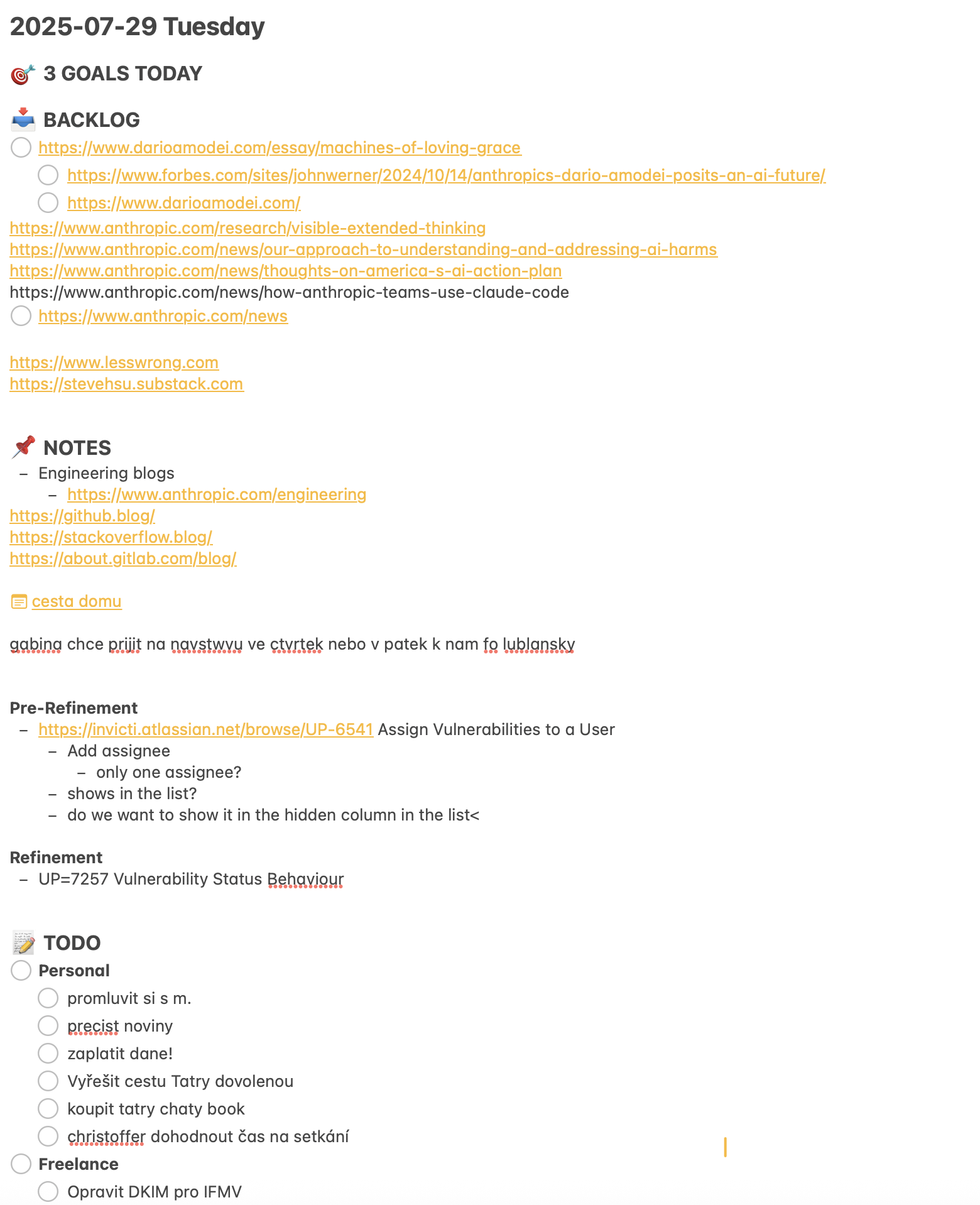
The way I use Apple Notes as my productivity app is quite simple. Every morning I create a new note with a title in the format year-month-day, copy a prepared structure into the empty note, and all day long I write everything important into this one note, which I have open on my MacBook, iPad and iPhone, and also online in the browser on my work laptop running Windows. Whenever I change something on any of these devices, I see the change immediately thanks to iCloud sync.
When I mentioned the structure that I copy every morning into the new note representing that day, I had the following template in mind:
TEMPLATE 2025-01-01
🎯 3 GOALS TODAY
📥 BACKLOG
📌 NOTES
📝 TODO
🗓️ AGENDA
The 🎯 3 GOALS TODAY section is the one I use least, yet I keep it for days when I have a demanding day ahead and need to decide in the morning which tasks are most important for me, bring the most value and have the clearest impact on my productivity.
Into the 📥 BACKLOG section I add, during the day, links to videos, podcasts and articles, or just vague tasks that occur to me without my having any idea what they require or when I will get to them. During the day I can take some items from this section and move them to the other sections.
Notes from meetings, phone calls or reading articles I jot down in abbreviated form in the 📌 NOTES section. If I have the time and the mood, I then edit these jottings and turn them into a more complete note in another system, which I also keep in Apple Notes, for notes on books and articles using the Zettelkasten method.
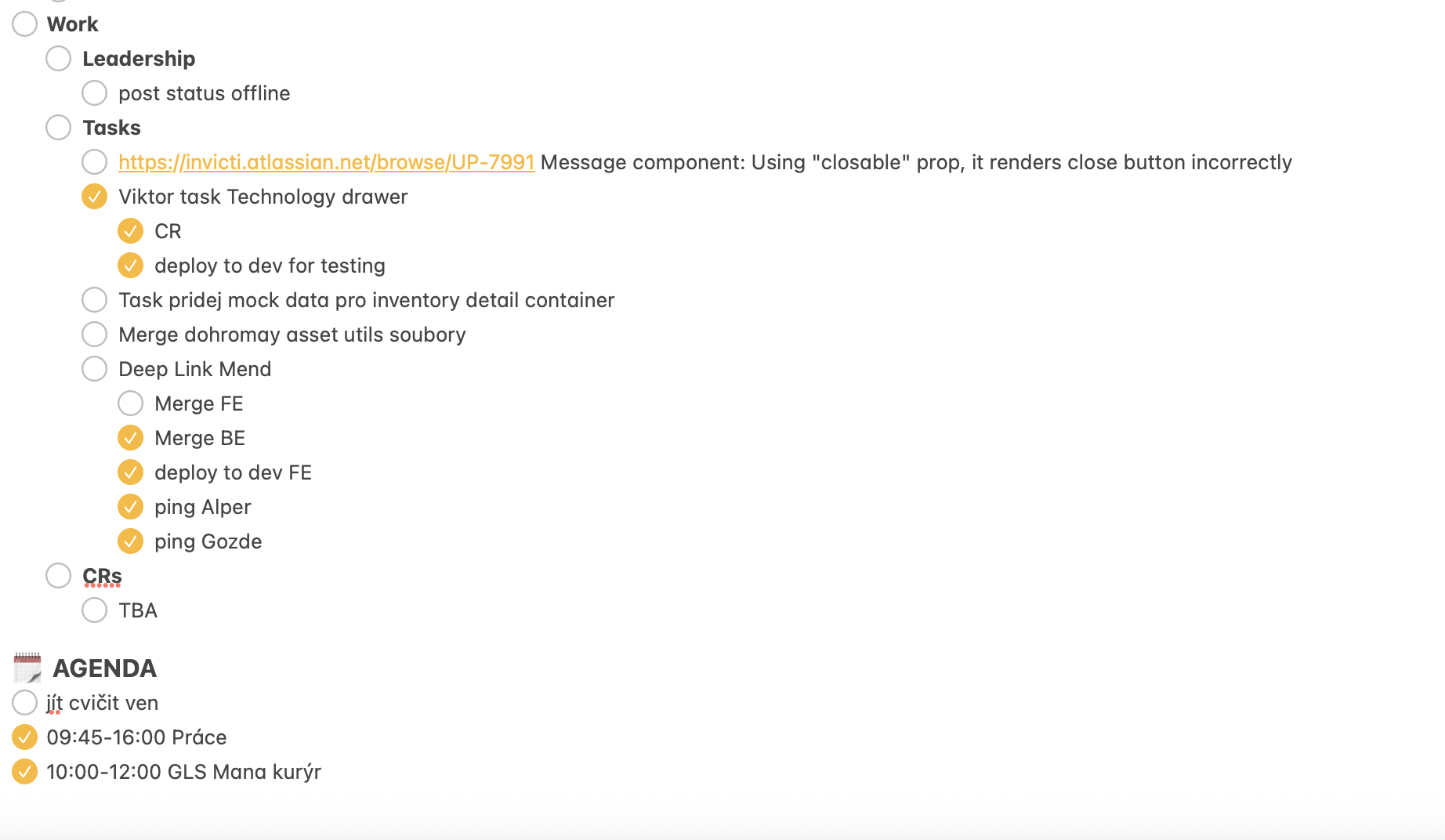
All the tasks for the day I write as checkable items in the section 📝 TODO. I also like to indent the individual tasks by topic: Work, Personal, Family, Finance, Learning, Health Maxxing, etc.
And finally, all the tasks that have a clearly set time I write as checkable items in the 🗓️ AGENDA section.
At the end of each day I should ideally review for myself what I managed to do and tick off that day, and what, on the other hand, was left over. Usually I copy the unfinished things into the note for the next day. Whatever I find useful to have outside this system I add to another Apple app, Apple Reminders, where I have something like a global Backlog, to which I add links to articles, videos, podcasts and so on via the Share button available in most apps on desktop and mobile devices.
If I need to plan what could be called a Project, that is, a long-term, sustained activity with some goals somewhere in the future, I again use Apple Reminders, where I have a simple Kanban system of columns ranging from things I have not started, to things I am working on, things I am waiting on, and things that are already done.
The greatest benefit I get from Apple Reminders, though, is that I use it as a global dumping ground for my thoughts and for whatever I come across during the day, my Bucket. I know there are dedicated apps for this with many more features and with APIs that allow connecting third-party apps, and so on. But what suits me about Apple Reminders as a dumping ground is its simplicity and its ubiquity across all my devices.
This system suits me not because it is the best possible one. But it is a good tool for my personal requirements, among which I count simplicity and access from all devices.
I do not aspire to be a minimalist for its own sake, even though such an approach is close to me both aesthetically and in how it feels. Somehow, quite naturally, as one gets older and deals with more important things in life, one settles for what works and stops chasing all the latest solutions.
I realised, and I am not claiming any originality here at all, that it is not about having the best app. What matters more is having your own system and being consistent in it.